MOFT
MOFT - Multipolar Optical Forces Toolbox

Github repository for this toolbox
General Description
Multipolar Optical Forces Toolbox is a Python code that allows to calculate the optical forces, torques and electromagnetic fields of optical systems formed by focused Laguerre-Gaussian beams (linearly or circularly polarized) impinging on spherical particles.
By employing the multipolar expansion of the incident beam, the Mie scattering solution, and the integration of the Maxwell stress tensor, MOFT calculates the exact solution of the optical forces and torques up to a cutoff multipolar order (currently set to 30). The multipolar decomposition of the incident field used in this toolbox provides a unique solution for highly focused beams fulfilling Maxwell’s equations.
In addition to a set of modules that estimate various parameters of interest—such as the multipolar expansion of highly focused and displaced beams, Mie coefficients, and analytical expressions for optical forces and torques—this toolbox also includes the ready-to-use program OT_EQUILIBRIUM_POINT_ANALYSIS.py. This program, given a particle and a trapping beam, calculates the equilibrium position and all associated dynamical parameters for both on- and off-axis trapping conditions. Additionally, it calculates the multipolar expansion of the beam displaced at the equilibrium point of the trap and plots the electromagnetic fields.
Installation
This toolbox requires the following packages: numpy, matplotlib, scipy, tqdm and sympy.
Python must already be installed.
Installation of the Python environment:
git clone https://github.com/QNanoLab/MOFT.git
cd MOFT

pipenv install
pipenv install .
pipenv shell
Once the installation is done, you will be able to run the program OT_EQUILIBRIUM_POINT_ANALYSIS.py on this environment. You can edit the parameters of the spherical particle and the focused LG beam for this calculation.
For running in the command line:
python OT_EQUILIBRIUM_POINT_ANALYSIS.py --plot-forces --plot-fields
Note: Interaction with the plotted figures may not be available until the program completes all the calculations. Close every figure window to finish the program.
The default simulation parameters show the following figures:
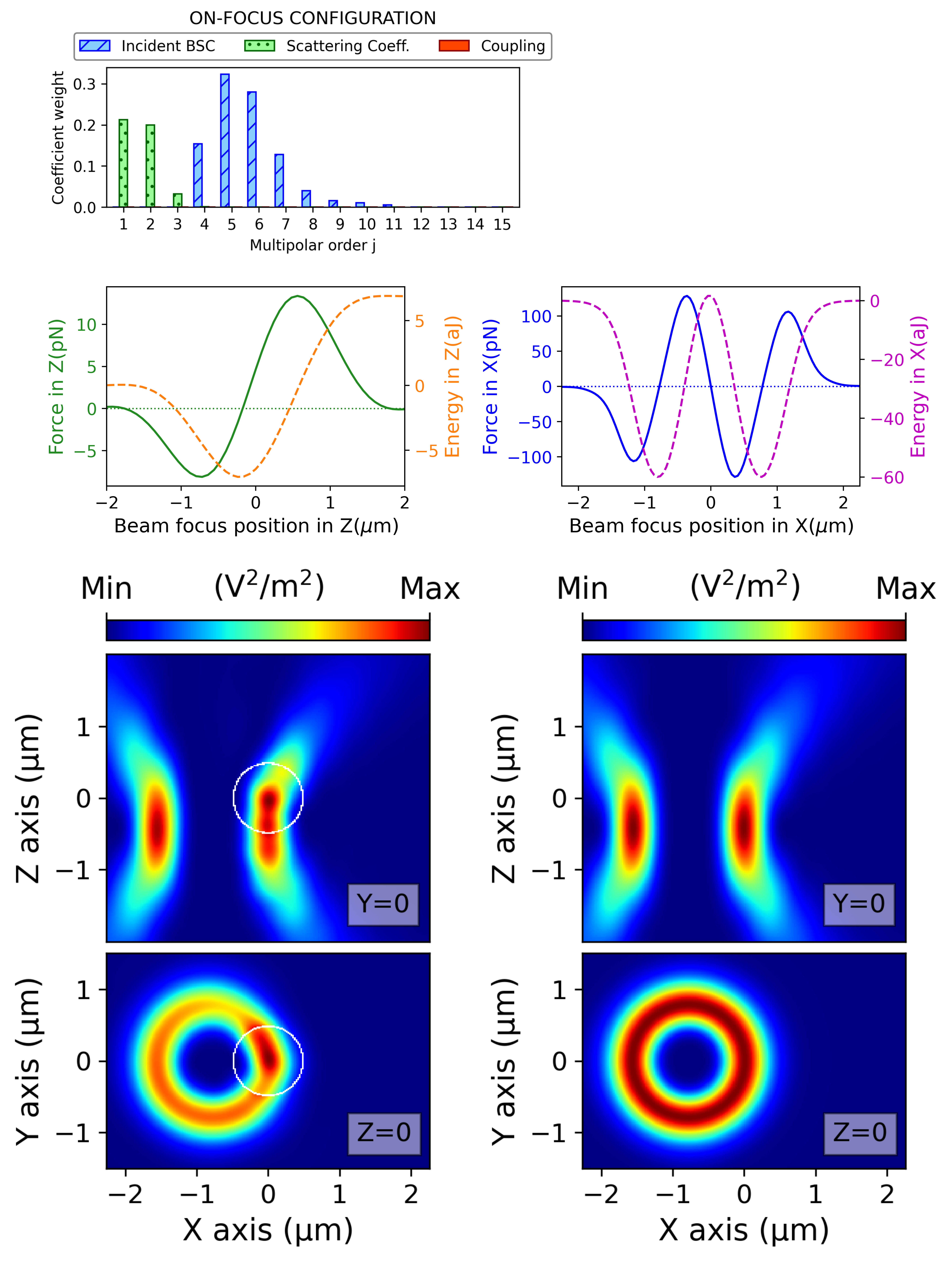
For the moment, this toolbox is designed to be used only on Linux OS.
Outline of the toolbox:
LGToolsmodule that containing special functions based on multipolar decomposition of electromagnetic fields and Mie scattering theory, applied to Laguerre-Gaussian beams in the following submodules:coefficientscalculate the Beam Shape Coefficients for on- and off-focus Laguerre-Gaussian beams, as well as the Mie coefficients for spherical particles.forcesanalytically calculate the optical forces in the x, y, and z directions for optical systems with on- and off-axis configurations.torquesanalytically calculate the optical torques in the x, y, and z directions for optical systems with on- and off-axis configurations.vshgenerate the Vector Spherical Harmonics (vsh) and the near- and far-field versions of the Well-defined Helicity Multipoles.- Miscellaneous auxiliary functions:
beam,coordinates_converter,equilibrium_point_finders,multipolar_fields_forces_plots, andsummation_of_multipoles.
-
TRANSLATION_MATRICEScontains precalculated displacement matrices to improve the speed of the multipole expansion for displaced beams. These matrices, which were precalculated for different displacements, can be iteratively combined and applied to the on-focus Beam Shape Coefficients to generate displaced beams. - The main program
OT_EQUILIBRIUM_POINT_ANALYSIS.pycalculates the optical forces and torques at the equilibrium point of the optical trap.
Outline of OT_EQUILIBRIUM_POINT_ANALYSIS.py
For this purpose, the main program “OT_EQUILIBRIUM_POINT_ANALYSIS.py” must be run, where the following steps are taken:
- Define the base parameters of the optical system. The main parameters are printed.
- Calculate the multipolar coefficients of the incident beam for the on-focus configuration and the Mie coefficients of the particle.
- Calculate Fz while the beam is displaced along the z-axis and determine the equilibrium point in this axis.
- 3.1. If there is no equilibrium point in the z-axis, “NO TRAPPING IN Z” is printed. END OF THE PROGRAM.
- 3.2. If there is an equilibrium point in the z-axis, calculate Fx while the beam is displaced along the x-axis from the equilibrium point of the z-axis and determine the equilibrium point in the x-axis.
- 3.2.1. If the equilibrium point in the x-axis occurs when the displacement of the beam in this axis is equal to zero, data for the on-axis equilibrium point is printed: kx, fx, kz, fz, Tz, (Fx=Fy=Fz=0, Tx=Ty=0). Electromagnetic fields of the optical trapping system at the equilibrium point are plotted. END OF THE PROGRAM.
- 3.2.2. If the equilibrium point in the x-axis occurs when the displacement of the beam in this axis is different from zero, the new equilibrium point off-axis is calculated. Then, data for the off-axis equilibrium point is printed: Fy (Fx and Fz should approach zero), kx, fx, kz, fz, Tx, Ty, Tz. Electromagnetic fields of the optical trapping system at the equilibrium point are plotted. END OF THE PROGRAM.
Set show_force_plots and show_field_plots to True or False to control the display of plots.
Alternatively, if command line is used, these variables can be controlled by --plot-forces and --plot-fields.
WARNING!, show_field_plots = True uses a lot of memory. Adjust the value of the variable resolution to reduce the memory employed.
WARNING!, variable ncores (number of cores employed in the paralelization process) must be adjusted to computer’s resources.
Cite
This toolbox has been used to calculate the results discussed in an article that is currently in publication process. Soon this message is going to be updated with the DOI of the article.